Initiation a New Hospitalization
1. After selecting the patient
2. Select Patient> Hospitalizations from left hand menu (the form opens immediately when entering 1st record)
3. Click Add New button opening the Hospitalization form

4. Note: Minimum requirements to save is hospital, admission date, event type, planned hospitalization and facility at the top of the form.
5. Recommended practice is to enter all information known when documenting.
a. Admitted to: Select hospital from picklist
b. Date of Hospital Admission: Enter date admitted to hospital
c. Event Type: Select from picklist
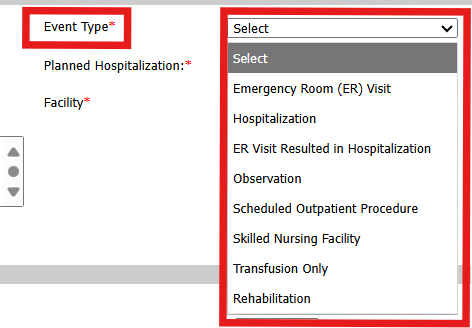
d. Planned Hospitalization: Select from picklist (yes/no)
e. Facility: Select from picklist the appropriate dialysis facility (Note: End of minimum requirement)
f. Notes: Enter as much information as known at time of admission to support hospitalization.
g. Infection Present:
i. If known select Yes
ii. If unknown select No until discharged.
h. Transfusions:
i. If known select Yes
ii. If unknown select No until discharged.
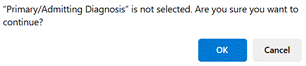
i. If saving without Admitting Diagnosis a pop-up will appear - Click OK
6. Sign & Save
7. Select Hospitalizations from left hand menu
8. Select date link of existing open Hospitalization
Completing a Hospitalization
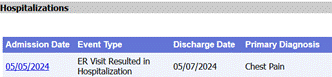
1. Complete the form using Discharge Summary
a. Date of Hospital Discharge
b. Date of 1st Hospital Tx: This is the date of first dialysis treatment during hospital stay.
c. Primary/Admitting Diagnosis Verify accuracy of previous entry or complete. If you are not able to find the "problem" your patient had during admission, you can add problems to the system by clicking on the blue + icon to the right of this problem list drop down box. If you do not see the blue + mark, please speak with your facility manager who should have access to this area. The Manager can click on the blue + mark to add it to the list for any future selections. This list also controls patient problem list options.
d. Other Diagnosis(es) Select from list any that apply to this hospitalization
e. Discharge Summary Obtained (yes/no)
f. Surgical Intervention: select from list any recorded on Discharge Summary
g. Infection Present: Verify accuracy of previous entry or complete
h. Transfusions: Verify accuracy of previous entry or complete
2. Additional sections Completing these improves the record and communicates to the clinical team all known information.
a. Treatment: Date of last treatment with information from inpatient flowsheet
b. Access
c. Medications
d. Lab Results (Note entry here does not move to Labs section but may be entered in Labs)
e. Co-Morbid Conditions: *Add new Comorbidities and Surgical history to Problem List.
f. Discharge Diagnosis #1 - #3
g. Notes: Enter specific information from discharge summary
3. Sign & Save
4. Approve & Lock
Note: Completing Hospitalization records supports quality data in the QAPI Tool
Note: Summaries are available in helpful locations:
Nephrology Dialysis Visit Note (DVN)
Nurses Monthly Assessment
CIPA - Nephrology Assessment
*Note: Hospitalization link is available from the No Show form when selecting Reason Hospitalization from the picklist. (See No-Show QRG).
HINT: Only one Hospitalization may be opened at a time. Complete an open Hospitalization before creating a New Hospitalization record.
Suggested Practice: Review Hospitalization Report monthly to assure all are completed and approved and locked.