Physician order authentication is an essential feature of Renvio, enabling efficient review, approval, and management of medical documents. Through Renvio, orders are automatically routed to the relevant physician, streamlining workflows and ensuring timely approvals.
1. Click the Approve & Lock button which will open a pop-up to electronically sign any document.

2. Put in the PIN or User ID and Password to sign the record and hit enter or click on the Ok button.
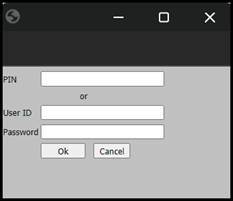
3. The Approved & Electronically Signed: field will now show the name of the user who approved the record along with the date and time of signing it. The Approve & Lock button will now change to Unapprove & Unlock.

Note: Physicians can view and approve the unapproved documents/orders by navigating to the following screen in EMR: Orders > View/Approve All Documents/Orders. Additionally, they can view remaining non-approved items by navigating to Orders > View Not Approved Orders.
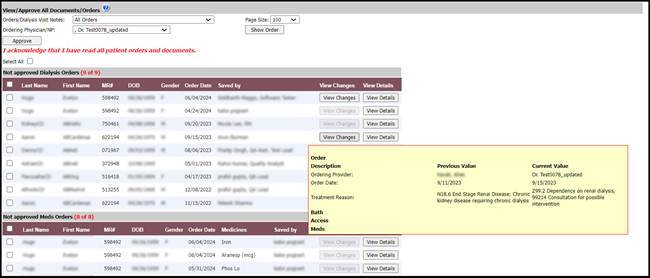
Physicians can select a specific order or all the orders at once to approve them by clicking on the Approve button. For added efficiency, the batch-approve function allows physicians to approve multiple orders simultaneously.
They can even check the changes made in the order by clicking or hovering over the View Changes button. To view the order in detail, one can click in the View Details button.