Documenting Refused Immunizations
1. Go to In-center Treatment > Treatment> Save Past Vaccine
2. Select the vaccine which needs to be documented from the Vaccine list.

3. Select the reason for refusal of vaccine under the Not Given Reason dropdown.
4. Put in the date for refusal in the Date/Refusal Date (MM/DD/YYYY) field.
5. Sign & Save the record.
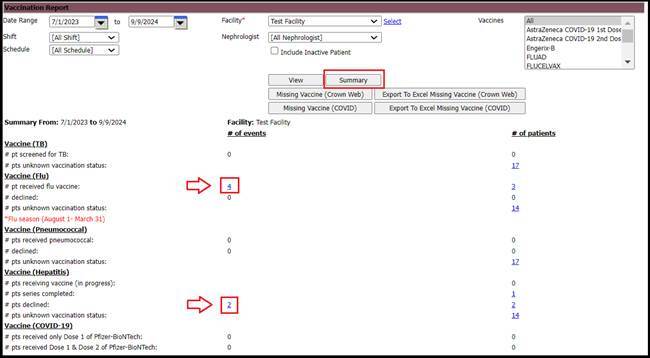
Note: To retrieve the vaccination information for missing/administered vaccines, one can use the Vaccination Report by navigating to the following screen in
EMR: Reports > Vaccination Report.
Select the date range, the facility and click on the 'summary to view the declined, unknown vaccination status, etc. One can click on the numbers corresponding to the status of the vaccination to view the patients who declined/have an unknown vaccine status/received the vaccine, etc. information in detail.