Accurately documenting and updating PD catheter infection records in Renvio is critical to maintaining comprehensive patient records and ensuring effective treatment tracking.

1. Go to Peritoneal Dialysis > Catheter > Catheter (PD)
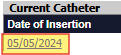
2. Select date hyperlink under Current Catheter/Date of Insertion
3. Select Infection from the options at the top of the screen

4. Click Add
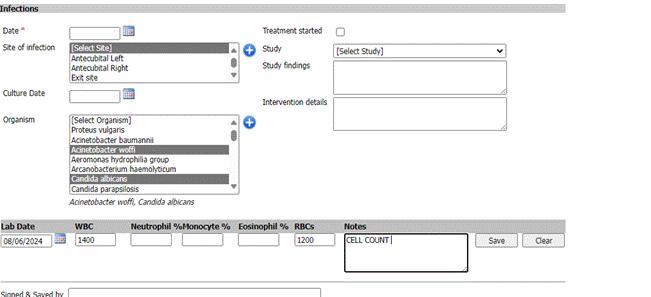
5. Enter the Date of the onset for that infection
6. Select Site of the infection for example: Left lower abdomen
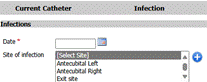
**if Peritoneum under Site of infection is selected, you will see CMS PD infection event.
You must sign and save first.
7. Add Culture Date if applicable
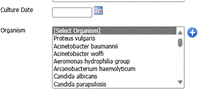
* Organism- Enter the Organism (if any) that is reported back from the fluid culture.
8. Click Treatment Started checkbox and enter date - if patient started on an antibiotic. (When checked this will open a list of antibiotics)
Select from option (hold CTRL to select more than one option)

9. Select Study, Study Findings and Intervention details if applicable

10. Enter Lab Date and Lab results, then click Save (Labs do not cross over in this area. Users will need to manually add lab results)

11. Click Sign and Save
Updating an Existing PD Catheter Infection Record
Follow this section when new lab results or additional information about an infection become available.
1. Select Organism
2. Add Lab Date and manually enter results
3. Click Save

1. Go to Reports
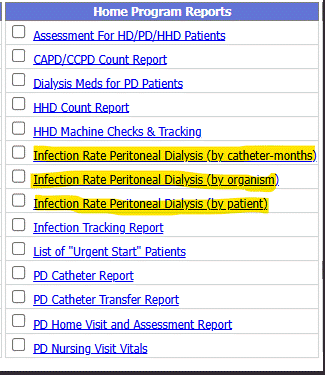
2. Under Home Program Reports
**Recommend reports for PD Infection Report
Infection Rate Peritoneal Dialysis (by catheter-months)
Infection Rate Peritoneal Dialysis (by organism)
Infection Rate Peritoneal Dialysis (by patient)