Staff should understand the need to protect information being entered under their Username and Password and assure they are navigating to the Treatment by Date screen when walking away from documenting.

1. By Pass Signature can be found in the Treatment by Date Screen when opening up a flowsheet for documentation.
2. The top right of the screen houses a box

3. Click Bypass Signature. Users will then be required to enter in their username and password.
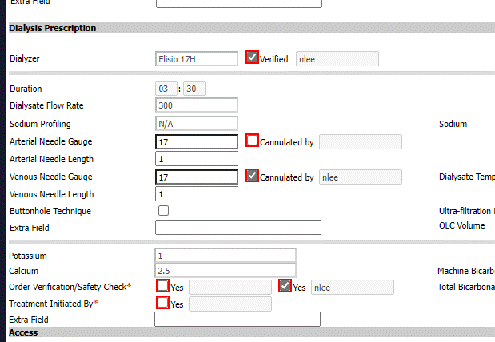
4. As long as the user remains on this screen and documents, all items checked will mark the specific users name and password to checkboxes. User name is populated as seen below when checkboxes are marked with no need for entry of password/pin each time.
1. When calling for second signature, staff need to assure they save, go to back to the Treatment by Date screen before calling for a second signature.
2. Marking the second box will allow a signature to be received from a remote location.

1. Bypass Signature also appears in the Dialysis Treatment Screen.
2. To remove your auto populating of the information, go back to Treatment by Date screen.

Bypass Signature is not specific to users and will be applied to an entire database. Training staff to understand going back to the Treatment by Date Screen prior to walking away to avoid mis documentation is key to success.