Admin Option> Masters > Meds
1. User need to add required med in Master list.
2. Navigate to Admin Option > Masters > Masters List > Meds and select Bottle Program for required med.
3. Select the category and save the screen.
4. Item Mapping and Dose detail masters to be updated.
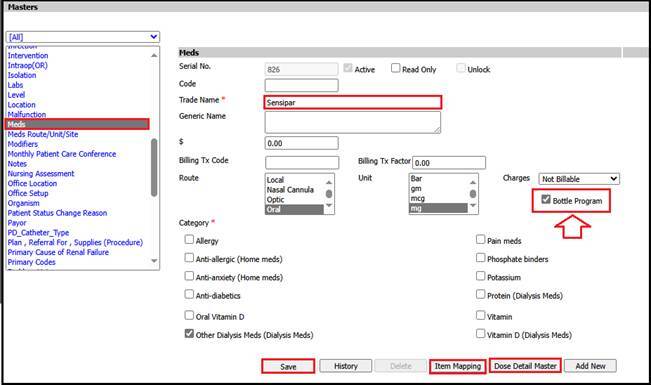
Note: - Bottle Program check box will be unselected by default.
In-center Hemodialysis > Orders > Dialysis Orders
User should put details of med in order along with other required details and 'Save & Sign.
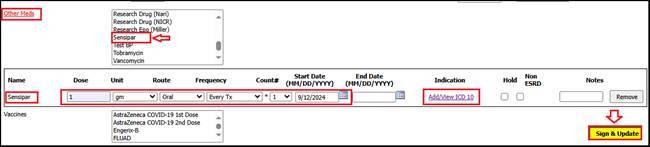
Incenter Hemodialysis > Treatments > HD Flowsheets
Med added in order will be reflected in respective flowsheet.
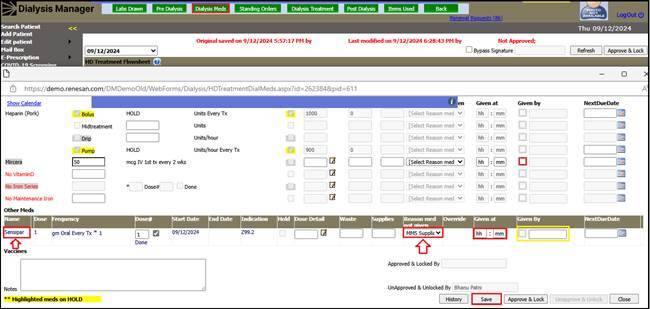
Note: - All Flowsheets (Meds Section) If Bottle Program is checked then under reasons in Flowsheet, it will auto select MMS Supplied.
Notes :-
Admin Options > Settings > System Parameter
Set Bottle Program meds default reason to "MMS Supplied" should be marked Yes.

If user will mark checkbox, All Dose detail selection popup under -
o HD/Extra/HHD Flowsheets
o PD/HHD Billing
o PD Nursing Visit
o HHD Clinic Visit
o HD Billing without Flowsheet screens