PD Orders
1. Select Patient
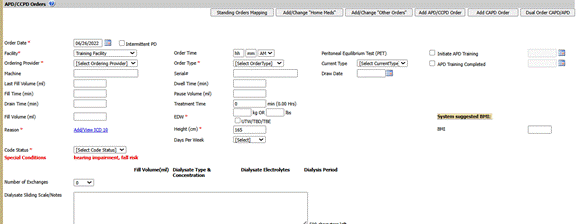
2. Navigate to Peritoneal Dialysis> PD Orders. Click on Add APD/CCPD Order button

The form when opened will display multiple sections
o APD / CCPD Orders
o Additives
o Daytime Manual Exchange
o Meds / Vaccines
3. Enter APD/CCPD order
o Order Date field - supports date of data entry documentation.
o Ordering Provider select Medical Staff from drop down list.
o Machine document cycler type patient is using to perform exchanges.
o Last Fill Volume (ml) document fill volume in milliliters
o Treatment Time document total treatment time for exchanges
o Tidal Percent document if applicable to patient
o Order Time pertains to when this PD order was obtained
o Order Type select from drop down list
o Fill Volume (ml) document volume in milliliters
o Dwell Time (mins) document Dwell time for PD solution
o Pause Volume (ml) document Pause Volume if applicable
o Target Weight - Weight may be entered in either kg or lbs and the application will auto-calculate the field omitted.
o Number of Exchanges - Using the drop-down list, select the numbers of exchanges based on the patient's orders.
o Fill Volume column Enter the total in milliliters to this exchange
o Dialysate Type and Concentration Open drop-down list and make selection(s) from listed choices.
o Dialysate Electrolytes Open drop down list and make selection(s) from listed choices.
o Dialysate Sliding Scale/Notes This area is a free texted space to document the adjustments to be made to the patient's dialysate concentration if applicable.
*** NOTE: Each PD Exchange will need to be documented one at a time. Once the first Exchange is completed, repeat these steps to fill out remaining Exchanges.